

bus route optimization, Dispatch Software, asset school bus tracking system, best gps device for school bus, driver navigation, easy gps tracker for school bus
Play blog summary Listen
Most products place safety under a heading. For a transportation director, the useful question is what the analytics can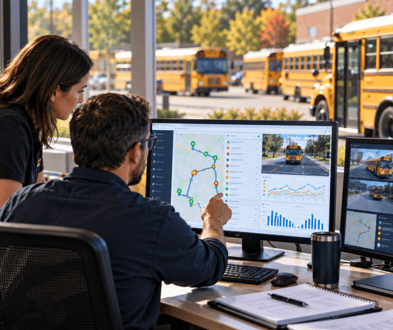 answer. What happened, was the service delivered, and can the district prove it?
The analytics that matter
A useful student transportation safety software review looks past feature names and asks whether each measure can support a clear decision. These school bus safety analytics capabilities should answer what happened, identify the evidence behind the answer, and show where a limited data record may fall short.
- Route and travel time What route did the bus follow, and how did travel time compare with plan? The system needs planned route details, GPS positions, and timestamps. A weak version flags a deviation without showing the planned path or the time and place of the event. TRIPpatrol provides route history and deviation alerts for review.
- Stops served and missed Did the bus reach each scheduled stop within the expected time window? Look for stop identifiers, the planned sequence, and GPS or arrival records. A weak version assumes a stop was served because the bus passed nearby, without evidence that it stopped.
- Boarding and alighting records Which students boarded or exited, and did each event belong to the active run? Useful records tie a student, bus, route, stop, and timestamp together. A weak version offers only a passenger count or leaves manual corrections unexplained. STUDENTpatrol supports student boarding and exit records.
- Speed and hard braking When and where did a speed threshold or braking event occur? This measure needs timestamped vehicle data, configured thresholds, and the bus or driver assignment for that run. A weak version shows raw event totals without location, trip context, or a way to review repeated patterns.
- Idling and time at stops How long was a vehicle stationary, and was it at a planned stop or elsewhere? The analysis needs location, time, and, where available, engine status. A weak version groups all idle time together, making it hard to distinguish a required wait from an unusual stop.
- Driver and vehicle assignments Who was assigned to the bus and route on the service date? Compare effective dated assignment history with run records. A weak version shows only the current assignment, leaving a gap when a director reviews a past trip.
- Exceptions and resolution What alert or service exception occurred, who reviewed it, and what action followed? The record should include the event, time, route, status, and resolution notes. A weak version keeps an alert log but does not show whether anyone responded. DISPATCHpatrol supports dispatchers making day of route adjustments.
- Maintenance that affected service Did an inspection issue or repair change a vehicle’s availability or affect a run?
Connect maintenance records with service dates, vehicle assignments, and any substitute bus or missed trip. A weak version stores work orders apart from the service record. FLEETpatrol addresses fleet maintenance records.
What separates useful analytics from a dashboard
A dashboard summarizes activity. Analytics should let you open an event and trace it to a route, student when applicable, vehicle, and time. It should show whether records are complete or only reflect the data that arrived.
Check whether dispatch, school, and transportation staff can view the same underlying record in ways that fit their roles. The numbers should also reconcile with the operational record used to run service. An alert without context is not analytics. ROUTEpatrol Web supports shared routing work, while LiveSYNC keeps student information aligned between BusBoss and a district SIS. Authorized family updates can be managed through PARENTpatrol.
Connecting safety analytics to compliance
Transportation compliance software should be able to produce records that support an inquiry, a state report, or an incident review without manual assembly. That means a director can retrieve the relevant service details and see the original event, its context, and any documented follow up.
A report built by hand after the fact is harder to defend than one drawn from the operating record. Ask which records are retained, who can amend them, and whether changes remain visible. The ROUTEpatrol Tablet App supports driver collection of ridership information and vehicle inspection forms, which can contribute to a review when those records are part of the district’s workflow.
Connecting safety analytics to cost
The same visibility that helps explain service issues can inform school bus operating cost optimization. Route deviations, excess idling, and unnecessary miles all affect spend. When the record connects those events with the run and vehicle, you can examine service quality and costs together instead of treating them as separate questions.
What to ask a vendor
Use these questions to test whether a dashboard reflects records your team can rely on.
- Data sources For school district transportation management, which systems supply the route, GPS, student, assignment, and maintenance records?
- Completeness How does the product identify missing or delayed records, rather than presenting partial data as complete?
- Event context Can an event be linked to its route, student when relevant, vehicle, and time?
- Operational connection Does student transportation routing and tracking draw from the same records staff use to plan and run service?
- Dispatch visibility Can school bus dispatch software show the event history that staff need for real-time bus dispatch?
- Retention and access How long are records retained, and can access be set by staff role? How does the system document corrections?
- Coordination What records support school bus fleet coordination when an assignment or vehicle changes?
- First term measures Which measures can the district evaluate in the first term, and what data must be ready first?
Discuss implementation challenges early. A districtwide software rollout may need to account for staff training, existing procedures, and available data. A short review each term helps school transportation management stay aligned with what the reports show.
Summary and next steps
The strongest safety analysis answers three questions with one traceable service record. It shows what happened, whether the planned service was delivered, and what evidence supports the district’s conclusion. Start with route and stop records, link exceptions to their response, and check that reports reconcile with daily service.
Review the BusBoss product overview, then schedule a demo to discuss the records and measures that matter to your district.

PRESIDENT
Sonia has been involved with BusBoss since the late 1990’s, and has personally overseen many projects for various customers ranging from large urban and suburban districts to smaller rural school districts from all over the country.

 (484) 941-0820