

bus route optimization, Dispatch Software, asset school bus tracking system, best gps device for school bus, driver navigation, easy gps tracker for school bus
Play blog summary Listen
School transportation is one of the most data intensive operations in a district. Every day, transportation teams manage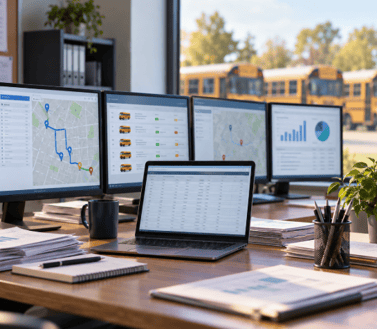 student addresses, eligibility, stops, routes, drivers, buses, schedules, GPS locations, ridership records, maintenance details, parent notifications, and financial information.
When this data is spread across systems that do not communicate, your team loses time and visibility. Staff must compare spreadsheets, reenter student records, confirm route changes by phone, and search through separate applications to answer basic questions.
These are data silos. They are common in school transportation because districts often add technology one need at a time. A routing platform may come first. GPS tracking may come later. A student information system, parent app, dispatch tool, and billing system may be managed by different departments or vendors.
Each tool may work well by itself. The problem begins when the tools do not share current information.
What a school transportation data silo looks like
A data silo forms when important information is stored in one system and cannot move easily to the people or applications that need it. In school district transportation, this often affects five connected areas.
- RoutingRoute planning may rely on student addresses and eligibility records that were imported weeks ago. If the student information system has changed since the last import, the route may not reflect the current situation.
- DispatchDispatchers may work from a separate application that does not show the latest route version, student assignments, or vehicle status. This makes last minute changes harder to manage.
- GPS trackingGPS data may show where a bus is located without connecting that information to the planned route, assigned students, or current ridership.
- Student informationStudent addresses, custody arrangements, school assignments, and transportation eligibility may remain in the SIS. Transportation staff then maintain a second version of the same information.
- Billing and payrollTrip counts, mileage, driver hours, and service records may sit in separate billing or finance tools. Staff often move information between systems through manual entry or file exports.
The result is not simply inconvenience. It creates multiple versions of the truth.
Why disconnected transportation systems happen
Most districts do not choose disconnected transportation systems intentionally. Silos usually develop over time as budgets, staffing, and operational needs change.
Technology is purchased in stages
A district may purchase routing software to address inefficient routes. Later, it may add GPS tracking to improve visibility. A parent communication app may be introduced after families ask for better arrival updates.
If each purchase is evaluated separately, the district may gain useful tools without gaining a connected technology environment. The transportation department then becomes responsible for moving data between products.
Departments use different priorities
Transportation teams focus on routes, drivers, students, and daily service. IT teams focus on security, access, and infrastructure. Finance teams focus on billing, contracts, and budget controls.
Each department may have a valid reason for using a specific application. Without shared data standards and ownership, the district creates a collection of systems that serve individual needs but do not support the complete transportation process.
Legacy software may not support modern integration
Older applications may depend on paper reports, spreadsheets, or scheduled file imports. Some systems were not designed to support application programming interfaces or continuous data exchange.
This creates system maintenance challenges. IT staff must preserve old connections, monitor scheduled imports, and troubleshoot failures that are difficult to see from a single dashboard.
Data standards are not consistent
One system may identify a student by an internal ID. Another may use a local record number. A third may use a name and address combination.
Addresses may also be formatted differently. One record may include an apartment number while another does not. One system may identify a student as active while another still shows the student as withdrawn.
These small differences can create duplicate records, failed imports, and incorrect assignments.
Staff capacity is limited
Transportation directors are already managing driver shortages, changing enrollment, vehicle availability, special transportation needs, and parent concerns. Manual reconciliation is often added to the workload because there is no time to redesign the process.
Over time, workarounds become routine. A spreadsheet may become the unofficial source of truth. A dispatcher may maintain a personal list of driver assignments. A staff member may keep notes about students who have moved but whose records have not yet been updated.
The process may appear to function until a disruption exposes the gaps.
The operational cost of data silos
The effects of disconnected systems are felt throughout the school district transportation operation.
Slower route planning
Accurate route planning depends on current student data, bell times, stop locations, bus capacity, driver availability, and special transportation requirements.
When these inputs are stored separately, planners spend more time validating information before they can make a decision. The district may also miss opportunities to combine stops, reduce deadhead mileage, or adjust service based on actual ridership.
Tools such as ROUTEpatrol Web help transportation teams work with route and student information in a shared environment. The goal is not only to create a route. It is to make sure the route is based on data that the rest of the operation can trust.
Weaker dispatch visibility
A dispatcher needs to understand what is happening now. That includes the location of each bus, the route being operated, the driver assigned, the students expected on board, and any changes already made.
If those details are spread across several applications, dispatchers may need to make phone calls or open multiple screens. During a breakdown or driver absence, this delay can affect the entire operation.
DISPATCHpatrol supports same day route changes and helps dispatchers update assignments without rebuilding the permanent route plan. When combined with the ROUTEpatrol Tablet App, updated instructions can move directly to the driver.
Lower ridership data accuracy
Ridership information is more useful when it is connected to route, student, and vehicle records. A boarding record should answer several questions.
- Which student boarded
- Which bus was used
- At what time and location did boarding occur
- Was the student assigned to that route
- Where did the student exit
Without connected systems, staff may have a list of students in one tool, a bus location in another, and a paper or spreadsheet record of boarding activity.
That makes student ridership verification systems harder to manage. It also limits the value of student boarding verification because staff cannot easily compare expected riders with actual riders.
STUDENTpatrol connects student ridership information with bus and route data. It can support live load counts, boarding and exiting records, and alerts for students who attempt to board the wrong bus or use the wrong stop.
Increased communication risk
Parents and schools expect timely information when a bus is delayed, a route changes, or a student has boarded. If the parent communication system is separate from dispatch and GPS tracking, staff may need to send updates manually.
That process introduces delays and inconsistent messages. A dispatcher may know that a bus is late, while a parent app continues to show an outdated arrival estimate.
With PARENTpatrol, families can receive bus location updates, estimated arrival information, and notifications connected to transportation activity.
Greater compliance and liability exposure
A district must be able to explain how it assigned students, managed route changes, verified ridership, and responded to incidents. Inconsistent records make that review more difficult.
Silos can also increase the risk of enterprise district misuse. This occurs when a system is used outside its intended controls, such as when staff rely on unofficial exports, shared logins, personal spreadsheets, or manually edited files to make operational decisions.
A connected system does not remove the need for policy. It gives the district better control over access, version history, data ownership, and reporting.
How integrated transportation data reduces risk
Transportation data integration creates a reliable flow between systems. The objective is not to place every piece of information into one application. The objective is to make sure each authorized system receives the information it needs at the right time.
For example, a student address update should not remain only in the SIS. It should move into the routing process, update the student assignment, and become available to staff who need the current information.
LiveSYNC helps connect BusBoss with a district SIS. It can move student adds, withdrawals, address changes, and routing information between systems. This reduces duplicate entry and limits data drift.
For vehicle visibility, TRIPpatrol can show current vehicle locations, route history, deviations, speed, and stop activity. When GPS data is connected to route data, managers can compare the planned trip with the actual trip rather than viewing a vehicle location in isolation.
A connected response to real time disruptions
Data silos become especially serious when a disruption happens during a route. A strong real time bus rerouting process should follow four steps.
- Detect the disruption instantlyIdentify the breakdown, driver absence, road closure, delay, or safety issue through dispatch reports, GPS alerts, driver communication, or school notifications.
- Reassign and adjust using intelligent softwareReview available buses, drivers, route capacity, student assignments, and timing. Make the change in a system that can account for the full transportation picture.
- Push instructions directly to driver tabletsSend the updated route and instructions to the driver through the ROUTEpatrol Tablet App. This reduces reliance on verbal directions and printed pages.
- Keep parents and schools informedUse connected notifications to share relevant changes with families and school staff. This helps reduce confusion and gives everyone a consistent view of the situation.
The value of this process depends on the quality of the underlying data. If the vehicle list, student assignments, route version, or contact information is outdated, even a fast dispatch response may be based on incorrect assumptions.
How transportation directors can start breaking down silos
Replacing every system at once is rarely practical. A measured assessment can help your team find the highest risk gaps first.
- Map the movement of dataDocument where student, route, GPS, driver, vehicle, ridership, billing, and maintenance data originates. Record where it is entered, changed, exported, and used.
- Identify duplicate recordsCompare student IDs, addresses, bus numbers, driver assignments, and route names across systems. Track how often staff find mismatched records.
- Measure manual workCount the hours spent on reentry, spreadsheet cleanup, phone confirmation, report reconciliation, and correction of failed imports.
- Set data quality measuresTrack sync delay, unmatched student records, route changes not received by drivers, boarding exceptions, GPS coverage, and parent notification failures.
- Establish ownershipAssign responsibility for each important data set. The SIS may own enrollment. Transportation may own route assignments. Dispatch may own same day changes. Finance may own billing records.
- Protect access and privacyUse role based permissions and secure transfer methods. The U.S. Department of Education student data security checklist offers useful guidance for districts reviewing how sensitive information is handled.
- Choose integration before adding another toolAsk whether a new application can share data with the systems your team already depends on. A feature rich product that creates another isolated database may increase the problem.
The bigger value of connected school transportation technology
Integrated school transportation technology gives directors more than a collection of features. It provides a clearer operating picture.
A route planner can use current student information. A dispatcher can see the active route and vehicle location. A driver can receive updated instructions. A parent can receive a more useful arrival notification. A manager can review ridership data accuracy and identify underused or overloaded service.
The same connected data can support better budgeting. Actual mileage, route history, ridership, driver time, and bus use can help managers evaluate cost and service decisions. Instead of relying on estimates from separate reports, leaders can analyze the relationship between resources and outcomes.
This is where operational efficiency becomes measurable. Useful indicators include reduced manual entries, fewer route corrections, lower duplicate ridership records, faster disruption response, improved on time performance, and fewer unanswered parent calls.
Summary and next step
School transportation data silos happen because districts often add tools over time without a plan for shared data, common identifiers, ownership, and secure integration. Separate routing, dispatch, GPS, student, billing, and maintenance systems can create slow decisions, inconsistent records, weak visibility, and avoidable safety risks.
The solution is not always to replace every application. Start by connecting the information that drives daily decisions. Focus on current student records, reliable route assignments, real time vehicle data, accurate ridership, direct driver communication, and timely parent updates.
BusBoss brings these functions together through solutions such as ROUTEpatrol Web, DISPATCHpatrol, TRIPpatrol, STUDENTpatrol, PARENTpatrol, ROUTEpatrol Tablet App, and LiveSYNC.
Schedule a BusBoss demo to review your current systems, identify data gaps, and see how a connected transportation environment can improve safety, visibility, data accuracy, and daily operational efficiency.

PRESIDENT
Sonia has been involved with BusBoss since the late 1990’s, and has personally overseen many projects for various customers ranging from large urban and suburban districts to smaller rural school districts from all over the country.

 (484) 941-0820