

bus route optimization, Dispatch Software, asset school bus tracking system, best gps device for school bus, driver navigation, easy gps tracker for school bus
Play blog summary Listen
School bus routing software is usually selected by the people who build runs. In a demonstration, a route may look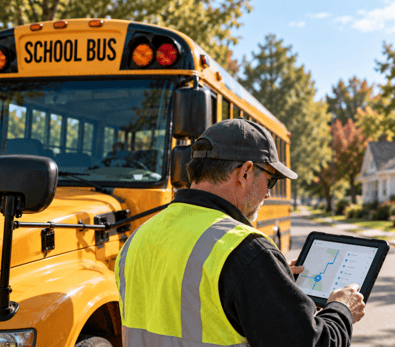 complete, map cleanly and meet the office’s planning rules. But a good map is only one test of the tool.
Drivers and substitutes are rarely in the room when the district chooses. Their experience is judged later, when a stop moves, a road closes or the route sheet says one thing and the tablet another. That is why familiar breakdowns often surface in September, not in a demonstration.
Here are eight places a tool can break between an approved plan and a driver’s day, along with the practical cost of each.
Where the breaks show on the road
- The map ignores bus restrictions. A route sends a driver toward a low clearance, a prohibited turn, a narrow street or a school entrance that has no safe bus approach. The driver must stop and find a legal way through, or call dispatch from a safe location. Either way, the schedule slips and the suggested path may create an avoidable risk.
- Office changes do not reach the cab. A stop moves, but the tablet or printed copy still shows the old location. The driver passes the new stop or pulls over where a student no longer waits, while dispatch believes the change is active. A connection between DISPATCHpatrol and the ROUTEpatrol Tablet App is one example of how changes can reach the driver’s device.
- Stop information is hard to follow in motion. The route is organized for office review, not for the next turn. At a school loop or unfamiliar intersection, the driver searches a list or switches between a map and notes to find the next stop. That distraction can mean a missed turn, a delayed pickup or a call to clarify directions.
- Useful details get buried. A screen or printout may show fields the driver does not need while obscuring the detail that matters now, such as which side of the road to approach or where to stop. The driver has to scan more information at the curb, increasing confusion and slowing the run.
- Dispatch cannot confirm receipt. A message is sent, but there is no clear acknowledgment that the driver received or understood it. Dispatch calls the bus to check, or assumes the change was seen. That uncertainty can delay a departure and leave the driver guessing which instruction is current.
- Substitutes are left to interpret the route. A replacement driver gets a printout and a quick phone call. Local street names, stop notes and school entrances may be unfamiliar. The substitute may miss a turn or need repeated directions, adding pressure for the driver and dispatch alike.
- There is no clear way back from the cab. A driver encounters a blocked stop or a detail that does not match the street, but has no simple way to flag it for dispatch. The driver must remember the issue until a safe moment to call, or work around it without the office knowing. The same problem may affect the next run.
- Paper quietly becomes the working record. Staff print a side sheet, write changes by hand and pass it to the driver. That copy may be more accurate than the digital record, but later edits may not make it back. TRIPpatrol can help show where a vehicle traveled, but a handwritten change can still leave the official route out of date.

Why these problems repeat
These are not unusual edge cases. They are daily frictions in a normal district, and they repeat when the people who feel them are not involved in choosing the tool. A district may test school bus dispatch software for how it builds routes and still miss how school transportation management holds up during a busy morning.
This is where routing software limitations become visible. Roster changes can also affect the information drivers use. LiveSYNC supports updates between student records and routing records, while STUDENTpatrol and PARENTpatrol serve related ridership and family information needs. None replaces a clear, current instruction in the cab.
What the failures cost
The costs add up across transportation operations. Late departures create phone chains among drivers, dispatchers and schools. Repeated confusion frustrates drivers and can contribute to retention problems. If an incident needs review, the office record may not match what the driver actually ran.
What to do with the list
Run this list against your current tool during a normal week, not during a demonstration. Include a route with a tricky approach, a late stop change and a substitute driver. Note where staff rely on phone calls, extra printouts or personal knowledge. These workarounds can hide the failures because the office has learned to absorb them.
Use the findings during school bus route planning and ask drivers what they have to double check before pulling out. The companion guide covers what a driver friendly tool must do instead, with driver usability at the center. For districts with several yards or contractors, enterprise transportation management also needs to keep approved information consistent across operations.
See BusBoss Enterprise and the BusBoss product overview for an overview of available options.
Summary and next step
A route can pass every office planning test and still leave the driver with a blocked turn, an old stop or an unclear instruction. The key takeaway is to look for these breakdowns in daily use, where workarounds and small delays reveal what a demonstration may not.
Review how your current tool holds up, then schedule a BusBoss demo to see how its routing and driver tools fit your district.

PRESIDENT
Sonia has been involved with BusBoss since the late 1990’s, and has personally overseen many projects for various customers ranging from large urban and suburban districts to smaller rural school districts from all over the country.

 (484) 941-0820
