

bus route optimization, Dispatch Software, asset school bus tracking system, best gps device for school bus, driver navigation, easy gps tracker for school bus
Play blog summary Listen
A dispatcher can only act on the information available at that moment. If student records, vehicle locations, or driver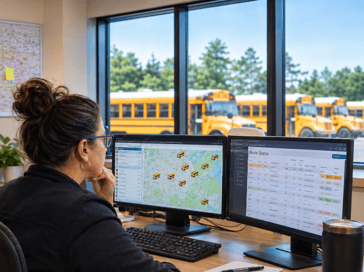 updates arrive late, a dispatch screen may show a situation that has already changed. The result can be delayed decisions, extra calls, and confusion for families and schools.
The key is to see dispatch as a chain of data handoffs. Every decision waits on the slowest stream. This article covers three common sources of delay, what to measure at each handoff, and how to identify the slowest one first.
Three data streams that can slow dispatch
- SIS synchronization. This is the time between a change in the student information system and its arrival in the routing record. Manual exports can delay updates, while unreviewed withdrawals can leave outdated assignments in place. Dispatchers may act on a student list that no longer reflects enrollment or assigned stops.
- GPS latency. This is the age of the most recent vehicle position, not just whether a bus appears on a map. Coverage gaps and peak reporting loads can make a location stale. During a disruption, that lag can make it harder to judge which buses are close enough to respond.
- Driver tablet feedback. This is the time between a condition on the bus and dispatch learning about it. An unconfirmed message or a tablet that is not ready at pullout can leave dispatch without a timely update. That limits the team’s ability to confirm a change reached the driver.
What to monitor first at each handoff
- Student record arrival. Track the time from an SIS change to its arrival in the routing record, along with failed import counts. A growing delay, repeated import failures, or changes that remain pending through a dispatch period should prompt review. LiveSYNC is one BusBoss option for moving student changes between the SIS and BusBoss.
- Vehicle position freshness. Baseline the average age of the most recent vehicle position and the share of buses reporting on schedule. A rising age or a shrinking share of current reports can point to a coverage, device, or reporting load issue. TRIPpatrol provides vehicle position information for transportation teams.
- Driver confirmation. Measure the time between a dispatch message and driver confirmation. Also track the share of reports that arrive by phone instead of through the device. Longer acknowledgements or frequent phone follow up may indicate a device readiness or message delivery problem. The ROUTEpatrol Tablet App provides drivers with route details and a way to receive updates.
Why the slowest handoff decides the outcome
During a disruption, dispatchers act on the least current stream. Improving a fast SIS sync will not help much if vehicle positions are stale. Faster location updates also cannot make a route change effective if the driver has not received it.
The slowest handoff can change by time of day. Pullout can expose device readiness and synchronization issues. Dismissal may put more pressure on location updates and message volume. A useful real-time dispatch software setup makes these handoffs visible, rather than treating “current” as a single status.
A monitoring first framework
- Map the data path. Follow information from a student record through dispatch and the driver device to family notification. This produces a shared view of each handoff and its owner.
- Measure each handoff. Record timestamps at the source and destination of each update. This produces a baseline and reveals where elapsed time accumulates.
- Separate age from accuracy. A new record can still be wrong, and an accurate record can still be old. This produces a clearer picture of whether the problem is delay, data quality, or both.
- Review peak periods. Compare pullout, midday, and dismissal rather than relying on daily averages. This produces a view of capacity when dispatch is busiest.
- Set attention thresholds. Choose limits for stale positions, failed imports, and unconfirmed messages. This produces an early prompt to investigate before families call.
This approach can support school transportation management without asking teams to monitor every data point at once. Start with the handoff that most affects service, then expand as the data becomes reliable. For a broader view of dispatch and reporting capabilities, explore ROUTEpatrol Web.
A four step reroute process
- Detect the disruption instantly. Use the current vehicle position and driver report to confirm what has changed.
- Reassign and adjust using intelligent software. Use current student records and vehicle availability to identify a workable response. DISPATCHpatrol supports dispatchers making same day adjustments.
- Push instructions directly to driver tablets. Confirm that the updated direction reaches the device and is acknowledged. If the acknowledgement is delayed, follow the district’s escalation process.
- Keep parents and schools informed. Share the confirmed change through family and school channels. STUDENTpatrol and PARENTpatrol support student and family updates.
What large fleets should watch as they grow
Adding buses multiplies messages and events, rather than simply increasing them. More vehicles create more location reports, route updates, and driver confirmations, often arriving in bursts. Manual corrections that work at one yard can become difficult to manage across several yards.
This is where large fleet scalability matters. Set common definitions for a successful sync, a current location, and a confirmed message. Review these measures across each yard and dispatch period. Strong fleet management depends on seeing exceptions early, while consistent fleet operations depend on staff knowing what action to take when a threshold is missed. These practices also make school bus fleet coordination more manageable as the district grows.
A districtwide software rollout can reveal implementation challenges that are hard to see in a small pilot. Test peak periods, substitute assignments, and weak coverage areas before expanding. For context on available BusBoss products, visit the products overview. Clear measures also help teams handle dispatch system challenges and keep real-time logistics grounded in what staff can verify.
Summary and next steps
Dispatch is only as current as its slowest data handoff. Monitor SIS arrival times, vehicle position age, and driver acknowledgements first. Compare peak periods, separate stale data from inaccurate data, and set thresholds that prompt action before service concerns reach families.
That gives transportation directors a practical starting point for improving real-time bus dispatch decisions. To discuss your district’s data flow and see BusBoss in action, schedule a demo.

PRESIDENT
Sonia has been involved with BusBoss since the late 1990’s, and has personally overseen many projects for various customers ranging from large urban and suburban districts to smaller rural school districts from all over the country.
 (484) 941-0820
