

bus route optimization, Dispatch Software, asset school bus tracking system, best gps device for school bus, driver navigation, easy gps tracker for school bus
Play blog summary Listen
School transportation logistics has outgrown a routing tool plus spreadsheets. A modern platform needs to carry daily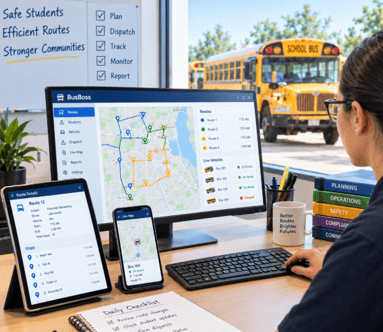 work from the first plan through service on the road and the records that follow.
For transportation directors, the useful question is not how many features a platform lists. It is how many of your actual workflows it supports, and whether information stays reliable as work moves between staff and tools. This guide defines five essential workflows and compares the platform postures districts can buy.
Five workflows a platform must carry
- Planning and schedule design. Routes and stops need to work at the start of the year and adapt as addresses, enrollment, bell times, and service needs change. Tools such as ROUTEpatrol Web help staff work with route information in one place.
- Daily execution. Assignments, substitutions, and confirmed instructions need to reach the right people before service begins. This is where school bus dispatch software earns its keep, and where real-time bus dispatch matters when conditions change mid service.
- Live visibility. Vehicle location is most useful when it is tied to a specific bus, run, and assignment, rather than shown as an uncontextualized point on a map. TRIPpatrol gives dispatchers location information to help answer practical service questions.
- Student records. Eligibility, assigned stops, and ridership details should come from the student information system instead of being typed repeatedly. LiveSYNC can help keep key student and transportation records in step.
- Records and cost. Service evidence should support billing, reporting, and decisions leadership can explain. For billing across contractors, Shared Billing & Contractor Payments is one part of the broader record keeping conversation.
Together, these capabilities support a student transportation workflow that staff can follow and review. A transportation management platform should make the handoffs between these tasks clear, not simply offer a long feature list.

Platform postures districts can buy
- A point tool. It may handle one workflow well, such as planning or vehicle location, but leaves staff to move information into spreadsheets for everything else. Its weakness is limited coverage.
- Separately licensed modules. Each workflow may have a tool, but records can split at module boundaries. Its weakness is that staff must check whether a change in one module reached the others.
- A bundled platform. Several workflows are sold together and may share some information. Its weakness is uneven coverage, so a district may still rely on manual steps for billing or substitutions.
- A single record platform. Planning, execution, visibility, student records, and cost draw from one system with role based access. Its weakness is not automatic completeness. Districts still need to confirm which workflows are truly covered and who can see or change each record.
These postures shape school bus fleet operations as much as the individual features do. A district with contracted service, multiple depots, or a large number of daily changes may need different coverage than a smaller department with stable assignments.
How to score coverage honestly
School transportation technology choices are easier to compare when the district names its own work first and asks the platform to match it, rather than the other way around.
Use a demonstration to test your actual work, rather than relying on a vendor’s labels. A useful logistics platform comparison follows the work from request to confirmed record.
- List real workflows. Write down the recurring tasks your staff complete, including address updates, substitute assignments, vehicle changes, parent questions, and invoice review.
- Mark the level of coverage. For each task, note whether the platform carries it natively, carries it with workarounds, or does not carry it. Ask staff who perform the work to validate the ratings.
- Test busy workflows. During a demonstration, ask to follow your two busiest workflows end to end. Use realistic examples and check where information is entered, reviewed, and confirmed.
- Count the systems. Track how many separate tools staff touch to complete one student change. Each additional step increases the chance that a record will be missed or become outdated.
- Inspect every handoff. Ask what happens to the record as it moves between tools, teams, and external partners. Integration gaps usually appear where nobody tested a handoff.
For student information exchange, ask what fields move in each direction, how often updates happen, and how errors are reported. Confirm that STUDENTpatrol and your existing district process support the level of detail your staff need. Avoid treating a successful connection as proof that every record stays current.
What tends to be missing
Cost and billing support, service records for contracted routes, and the substitute driver path are often left outside the main system. Those gaps become more visible in spring, when budgets and contracts are renewed and leaders need clear records of service and expense.
Ask whether the platform can retain the information your district needs from a completed trip through review and payment. Consider how vehicle condition records are handled, too. FLEETpatrol may complement this work, while school bus fleet coordination still depends on clear responsibilities across district staff and contractors.
What a covered district gets
When everyday tasks share reliable records, staff can answer a parent’s question faster, maintain fewer side spreadsheets, and preserve useful information when employees change roles. PARENTpatrol can help families access transportation information, while the ROUTEpatrol Tablet App supports driver instructions on the road.
A districtwide software rollout still takes planning. Data review, staff training, access rules, and agreed procedures all matter. These implementation challenges are easier to manage when the district chooses a clear sequence and tests everyday tasks before expanding use.
Summary and next step
The strongest platform is the one that carries the workflows your district depends on, with dependable handoffs and records staff can trust. Score coverage against your real tasks, test busy workflows in a demonstration, and investigate gaps in cost, contracted service, and substitutions before making a decision.
For an overview of BusBoss products, or to see how a solution could fit your district’s school transportation management needs, schedule a demo.

PRESIDENT
Sonia has been involved with BusBoss since the late 1990’s, and has personally overseen many projects for various customers ranging from large urban and suburban districts to smaller rural school districts from all over the country.

 (484) 941-0820