

bus route optimization, Dispatch Software, asset school bus tracking system, best gps device for school bus, driver navigation, easy gps tracker for school bus
Play blog summary Listen
Routes are designed by people who will never drive them and executed by people who did not design them. The gap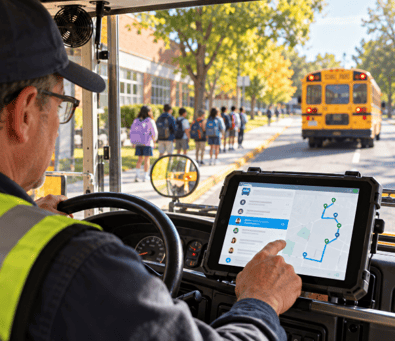 between those two environments is where a workable plan can come apart.
Most school bus routing software serves planners well and drivers poorly. The result shows up in the first week of school and with every substitution since. This guide explains what driver friendly means in practice, what enterprise ready adds, and how transportation directors can test whether a tool connects office decisions to the bus.
Why routing tools fail drivers in real operations
These issues are not a complete failure list. They point to a wider concern: routing software limitations become visible when the route leaves the planning screen and reaches the road.
- Map first, road second A route may look direct on a screen but ignore turn restrictions, tight approaches, or driveways a school bus cannot use. Drivers must improvise or call dispatch.
- Changes without a clear handoff A revised stop or run may exist in the office but not reach the driver in a useful form. The driver follows an older version.
- Planning order, not driving order A record organized for setup can make it hard to identify the next stop, time, or student detail in the cab. Drivers spend attention finding information instead of following it.
- No way to report what happened If a driver cannot flag a blocked stop or incorrect detail from the route, the district may keep using a plan that no longer matches the road.
What driver friendly actually means
A driver visible screen is not enough. Driver usability depends on whether the information is organized around the work of operating a bus, and whether a driver can rely on it as circumstances change.
- The route as driven Present stops in driving order, with the next stop easy to identify. Include only relevant details, such as stop location, expected time, student information, and special instructions. The ROUTEpatrol Tablet App provides route details and turn by turn directions, with student information for drivers.
- Change delivery with confirmation A change should reach the driver, be acknowledged, and remain visible to dispatch. A notification that cannot be confirmed leaves uncertainty about which version is active.
- Readability in the cab Text and controls should be clear in sunlight, glare, and vehicle motion. Keep the screen focused on the next driving task, with limited taps and no need to search through planning screens.
- Offline continuity The assigned route and essential stop information should remain available through a dead zone. Test offline behavior directly, including what the driver sees when service returns and whether records created during the gap sync correctly.
- Exception reporting from the cab Drivers need a straightforward way to flag a blocked stop, missing student, or incorrect detail without leaving the route. The report should give dispatch enough context to follow up and correct the shared record.
When a disruption changes a route, the response should follow a clear sequence. Real time bus dispatch is useful only when the instructions make it to the people who need them.
- Detect the disruption instantly Identify a road closure, vehicle issue, or other change that affects the assigned route.
- Reassign and adjust using intelligent software Give dispatch a practical way to make the needed change without losing the approved route record.
- Push instructions directly to driver tablets Send the current instructions to the cab and show the driver that the update arrived.
- Keep parents and schools informed Share appropriate updates with families and school staff so they know what to expect.
What enterprise ready adds
At district scale, school bus route planning must account for many people and moving parts. Multiple schools, tiers, substitutes, contractors, and student changes all affect the record. Enterprise transportation management means that access and updates work across those boundaries without creating competing versions.
Concurrent editing Planners, dispatch, and school staff need to work from the same current record. ROUTEpatrol Web supports multiple users working on routing and scheduling tasks at the same time.
- Role based access Set permissions for the work each person needs to do across yards, schools, and contractors. Clear access boundaries help staff make needed changes without exposing unrelated information.
- SIS integration Student changes should flow into transportation records instead of accumulating for later manual entry. LiveSYNC moves student additions, withdrawals, and changes between BusBoss and a district SIS.
- Substitute readiness A qualified substitute should be able to find the assigned route, understand the stop sequence, and start without relying on a lengthy verbal handoff. DISPATCHpatrol helps dispatchers reassign work when drivers are absent or buses are out of service.
- An audit trail The district should be able to see who changed a route, what changed, and when. This supports follow up when the actual trip and the planned record differ. BusBoss Enterprise connects route records with GPS information so districts can compare planned and actual travel.
The office and the road as one record
Driver friendly routing is not a separate app bolted onto a planning tool. It is the same route record viewed through different roles. Planners need tools to build and manage routes. Drivers need a clear, current version they can use in the cab. If those views do not share updates, changes can break at the handoff and transportation operations are left to reconcile conflicting accounts.
A connected record also makes it possible to review what happened. TRIPpatrol can help districts compare planned routes with the paths buses actually traveled. STUDENTpatrol and PARENTpatrol extend relevant student and bus information to authorized staff and families.
How to evaluate a tool for both sides of the gap
Treat a product demonstration as a field test, not a screen tour. Use a real route and involve the people who will plan, dispatch, and drive it. A practical test of school bus routing software should include these steps.
- Build and run the route the same morning Have a planner create a route, then give it to a driver without a verbal handoff. Passing means the driver can identify the run, stops, and instructions from the record.
- Change a stop mid morning Follow the edit from the office to the cab. Passing means the driver receives and acknowledges the update, and dispatch can see that it arrived.
- Assign the route to a substitute Time how long it takes the substitute to understand the route and be ready to go. Passing means the route is clear without a planner having to explain every stop.
- Test the worst coverage stretch Run the route through an area with weak service. Passing means the driver can still access essential route information and the district can verify what syncs when service returns.
- Report an exception from the bus Ask the driver to report a blocked stop or other issue, then find it in the office record. Passing means dispatch can locate the report and act on it without relying on a phone call to recreate the details.
What districts gain when the gap closes
When the office record and the trip agree, staff spend less time tracing details. Districts can reduce morning phone chains, speed up substitutions, and give drivers a more usable tool for the work they do every day. That can support retention by making the job more manageable. Records that connect the planned route with the actual trip also give administrators a clearer basis for safety reviews.
The change takes thoughtful preparation. Implementation challenges may include old records, different contractor practices, device setup, and staff training. A districtwide software rollout is more likely to hold when drivers, dispatchers, schools, and IT are included in testing before launch. For larger districts, school bus fleet coordination is not only a matter of assigning vehicles. It also depends on whether everyone can act on the same route information.
Summary and next steps
A reliable route needs to work beyond the planning screen. It should reflect roads a bus can use, put stop details in driving order, deliver changes with confirmation, remain available through connectivity gaps, and let drivers report what they encounter. At district scale, shared records, permissions, SIS updates, substitute readiness, and a clear audit trail help keep the plan current.
In short, the best test is whether the person who designed a route and the person who drives it can use the same accurate record. To see how BusBoss tools can support that handoff, schedule a demo.

PRESIDENT
Sonia has been involved with BusBoss since the late 1990’s, and has personally overseen many projects for various customers ranging from large urban and suburban districts to smaller rural school districts from all over the country.
 (484) 941-0820
