

bus route optimization, Dispatch Software, asset school bus tracking system, best gps device for school bus, driver navigation, easy gps tracker for school bus
Play blog summary Listen
A districtwide dispatch system can give transportation teams a clearer view of daily operations, faster response during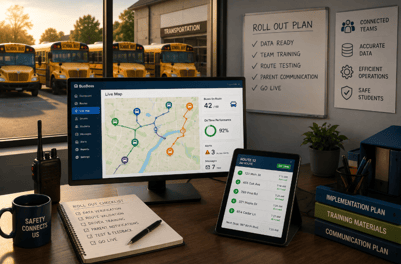 disruptions, and better communication with drivers, schools, and families. However, successful adoption requires more than installing software and creating user accounts.
A strong rollout connects people, data, devices, and daily procedures. It also gives transportation staff time to learn new workflows before the first day of school places them under pressure.
This guide explains how to manage school bus dispatch software implementation across a district. It focuses on data readiness, team coordination, driver usability, parent communication, and the implementation challenges that can affect district adoption.
Start with operational goals
The first step is to define what the district wants to improve. A rollout should solve specific transportation problems rather than introduce technology without a clear purpose.
Common goals include
- Responding faster when a driver is absent
- Adjusting routes when a bus is unavailable
- Giving dispatchers a live view of buses and route progress
- Reducing manual calls between dispatchers and drivers
- Improving parent access to bus locations and arrival estimates
- Creating more reliable records for ridership and route performance
- Supporting better decisions about bus capacity, route mileage, and staffing
These goals create a useful baseline for measuring progress. Before rollout begins, record current performance such as parent call volume, route mileage, on time performance, average response time for driver absences, and the number of manual route changes completed each week.
The goal is not to measure every possible activity. Select the metrics that reflect your district’s most urgent needs.
For example, a district dealing with frequent driver call outs may focus first on reassignment time. A district receiving hundreds of daily location calls may prioritize live tracking and parent notifications.
Build a cross team rollout group
School transportation affects more departments than the transportation office. A districtwide software rollout should include representatives from each team that creates, uses, or depends on transportation data.
Your rollout group should include
- A transportation director who owns the project and makes operational decisions
- Dispatchers who understand daily exceptions and communication needs
- Drivers who can test tablet workflows in real conditions
- Information technology staff who manage devices, access, and integrations
- Student services staff who understand specialized transportation requirements
- School office representatives who manage enrollment and address changes
- A family communications lead who prepares parent instructions
- A software implementation contact who coordinates configuration and training
Meet regularly during the rollout. Keep meetings focused on decisions, risks, testing results, and upcoming tasks. Frontline feedback is especially important. Dispatchers and drivers can identify problems that may not appear during a standard product demonstration.
Prepare the data before configuring routes
Real time dispatch depends on accurate information. If student addresses, stops, route assignments, vehicle records, or driver details are outdated, the system will reflect those problems.
Before importing data, review the following
- Student names and identification numbers
- Home addresses and geocoded locations
- School assignments and program schedules
- Bus stops and stop descriptions
- Vehicle numbers and seating capacities
- Driver records and current assignments
- Bell schedules and tier information
- Special transportation requirements
- Active routes and obsolete records
- Driver and vehicle pairings
Pay close attention to addresses that do not geocode correctly. A map point placed on the wrong street can produce an unsafe or impractical stop. Local transportation staff should review unusual locations because they know the roads, neighborhoods, and access restrictions better than a standard data check can.
Your integration plan should also identify how changes move between systems. The BusBoss LiveSYNC enhancement and SIF Agent can be evaluated as part of a broader data strategy. Districts can also review available integrations for systems such as PowerSchool, eSchoolData, and Blackboard communications.
The important question is not only whether systems connect. It is whether the right information reaches the right team at the right time.
Choose the right rollout structure
A districtwide adoption does not need to happen in one large launch. A phased approach gives the team time to test workflows, correct data, and build confidence.
A practical rollout may include the following phases
- Discovery and baselineDocument current systems, workflows, pain points, and performance measures.
- Data preparationClean student, stop, route, vehicle, and driver records. Confirm bell schedules and operational restrictions.
- ConfigurationSet up users, permissions, alerts, routes, communication templates, and device settings.
- Pilot testingSelect a manageable group of routes. Include different operating conditions such as general education routes, specialized transportation, multiple schools, and known problem areas.
- Parallel operationsAllow staff to compare the new workflow with the existing process. This can reveal route, device, and communication issues before full adoption.
- Wave based expansionAdd schools, depots, or service areas in groups. Do not move to the next group until the current group meets its readiness criteria.
- StabilizationMonitor performance after launch. Resolve recurring problems and refine training based on real use.
A pilot should use the same tablets, GPS devices, user permissions, and communication processes planned for the full launch. Testing on different equipment can hide issues that drivers will encounter later.
Design driver workflows around the road
Drivers need clear instructions that support safe driving. A new system should reduce unnecessary communication tasks, not create more of them.
The ROUTEpatrol Tablet App gives districts a way to deliver route information and updates directly to drivers. The ROUTEpatrol Web platform supports web based visibility for transportation teams.
Driver training should cover
- Logging in and starting an assigned run
- Reviewing the route and stop sequence
- Acknowledging a route change
- Reporting a delay, issue, or unavailable vehicle
- Handling a weak connection or device problem
- Using backup procedures when technology is unavailable
- Completing any enabled ridership or trip tasks
Keep the driver workflow as short as possible. Avoid asking drivers to enter information that dispatchers or other systems can provide automatically.
Give drivers time to practice before launch. A short session in a classroom is helpful, but it should be followed by supervised practice on an actual route or training run. Ask drivers which screens are unclear and which steps slow them down.
Use a standard process for real time rerouting
Unexpected events will continue after implementation. A driver may call out, a bus may become unavailable, or a road may be closed. The value of connected school bus routing and dispatch comes from helping teams respond consistently.
Use this four step process for every real time disruption
- Detect the disruption instantlyIdentify the issue through a driver report, GPS alert, dispatcher observation, or school notification. Confirm which vehicle, driver, route, and students are affected.
- Reassign and adjust using intelligent softwareReview available buses, drivers, route capacity, stop order, and timing. Reassign the route or combine and split routes when appropriate. The DISPATCHpatrol Web App is designed to help dispatchers make last minute route changes without rebuilding the entire planned schedule.
- Push instructions directly to driver tabletsSend the updated route and clear instructions through the ROUTEpatrol Tablet App. The driver should receive the same information that the dispatcher approved.
- Keep parents and schools informedNotify affected schools and families through the communication process defined by the district. The PARENTpatrol Mobile App can support parent access to bus locations and arrival information when configured for the district’s needs.
This process helps prevent conflicting instructions. It also creates a repeatable response that staff can practice during training.
Connect dispatch with tracking and ridership
Dispatchers need more than a list of routes. They need current information about vehicle location, route progress, and student activity.
TRIPpatrol GPS Tracking can provide vehicle location information and route visibility. STUDENTpatrol supports student ridership tracking through technologies such as RFID, NFC, and barcode readers.
When these systems work together, dispatchers can compare planned activity with what is happening on the road. That can help identify a bus that is late, a route that is consistently longer than expected, or a ridership pattern that suggests a route needs review.
The BusBoss dashboard and reporting resources can support regular review after launch. Focus on trends instead of isolated incidents. One late trip may reflect traffic or weather. A route that runs late every Tuesday may require a schedule or stop adjustment.
Prepare schools and families for adoption
Parent communication should begin before the system goes live. Families need to know what is changing, when access will become available, and where to get help.
Provide simple instructions that explain
- How to download or access the parent application
- How to sign in securely
- How to view a child’s assigned bus
- How arrival information may change during a disruption
- What information parents should verify before launch
- How to report a concern to the transportation office
Schools also need a clear process for handling address changes, student moves, route questions, and daily transportation exceptions.
The STUDENTpatrol page explains how ridership information can support transportation staff, school administrators, and authorized parents. Use that information as a starting point for internal communication materials, but tailor instructions to your district’s policies.
Set realistic expectations. Real time tools improve visibility, but arrival estimates can still change because of traffic, weather, construction, student loading time, or emergencies.
Address common implementation challenges
The most common implementation challenges are usually operational rather than technical.
Resistance from staff
Drivers and dispatchers may worry that new software will add work or reduce their control. Involve them early, listen to concerns, and show how the system handles problems they already face.
Inconsistent data ownership
If several departments update student or route information, define who owns each field and when changes should be reviewed. A shared process prevents conflicting records.
Device and connection problems
Test tablets, GPS equipment, charging routines, cellular coverage, and backup procedures before launch. Make sure staff know what to do if a device stops working.
Too much information
A dashboard with every alert enabled can overwhelm dispatchers. Start with the alerts that support safety and daily decisions. Add more only when the team is ready.
Weak follow up
Implementation does not end on launch day. Schedule reviews at the end of the first week, first month, and first quarter. Use feedback and performance data to guide improvements.
Select a platform that fits district needs
BusBoss offers several options for different district sizes and operating models. Transportation directors can compare BusBoss Professional, BusBoss Express, BusBoss Enterprise, and BusBoss SaaS. Districts can also review DISTRICTpatrol for broader transportation management needs.
The right choice depends on your current systems, number of users, fleet structure, data requirements, and implementation timeline. A useful evaluation should include real workflows, not only a feature list.
Ask vendors to demonstrate
- A driver absence and route reassignment
- A bus breakdown during an active route
- A student address change
- A parent notification during a delay
- A route update sent to a driver tablet
- A report comparing planned and actual operations
Summary and next steps
A successful districtwide adoption of real time school transportation tools is built through preparation, communication, and steady expansion. Clean data before configuration. Include dispatchers, drivers, IT staff, schools, and families in the process. Pilot with real devices and real workflows. Use a consistent four step rerouting process when disruptions occur. Then measure results and improve the system after launch.
The best school transportation management platform should help your team respond to change without creating more manual work. If your district is planning a districtwide software rollout, schedule a BusBoss demo to review your current workflows, integration needs, and rollout priorities.

PRESIDENT
Sonia has been involved with BusBoss since the late 1990’s, and has personally overseen many projects for various customers ranging from large urban and suburban districts to smaller rural school districts from all over the country.

 (484) 941-0820