

bus route optimization, Dispatch Software, asset school bus tracking system, best gps device for school bus, driver navigation, easy gps tracker for school bus
Play blog summary Listen
Every district faces live route changes. A driver may be absent, a bus may break down, or a road closure may disrupt a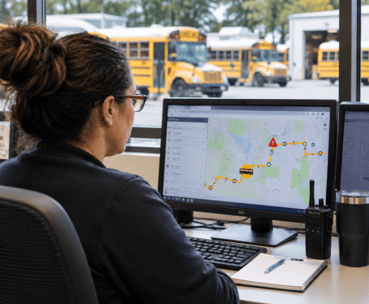 run already in progress. The software a district chooses proves its value in those minutes, not just in a scheduled demonstration.
This comparison follows one change from the first alert to the final message to families and schools. It looks at the trigger, decision, assignment, delivery, confirmation, and notification, then compares three types of tools against those steps. The goal is to help transportation directors judge how well each option supports school transportation management under pressure.
The anatomy of a live route change
A dependable response starts by detecting the disruption, then reassigning and adjusting the run, sending instructions to the driver’s device, and keeping families and schools informed. Each action depends on the one before it.
- Trigger. Detect the disruption promptly, whether it is an absence, breakdown, closure, or late vehicle. A slow alert costs dispatchers time and can leave staff working from outdated information.
- Decision. Identify who can authorize the response and give that person the information needed to choose. Without clear authority and current details, dispatch may lose time to calls or make a decision without knowing which vehicles and drivers are available.
- Assignment. Reassign the run and adjust it for the replacement driver and vehicle. Capacity limits and student ride requirements still need to hold. A gap here can create an assignment that looks workable on screen but cannot be carried out as intended.
- Delivery. Push the revised instructions directly to the driver’s tablet with the current version of the run. If the driver receives only a partial message or an obsolete version, they may follow the wrong instructions.
- Confirmation. Give dispatch a way to tell whether the driver received and acknowledged the change. Without confirmation, dispatch may believe the update was received when it was not, or spend time checking by phone.
- Notification. Keep families and schools informed with the same approved update dispatch has issued. If messages differ, families may prepare for one arrival time while the school is working from another.

Three tool postures
The label on a product matters less than what it can do across the six steps. These three postures show what to look for during a decision stage comparison.
- Communication first. These tools can be strong at notification, but a message channel alone does not hold the full run record. It may carry the update to a family or driver, while the decision and assignment remain in a call, text, or separate document. Those steps are left to phone calls and manual checks.
- Tracking first. Vehicle location can help a dispatcher understand where a bus is during a disruption. However, location information does not by itself record who is assigned to the run or whether the driver received revised instructions. This posture supports situational awareness, while assignment, delivery, confirmation, and family notification may still depend on calls.
- Dispatch platform on the same record as routing. This posture can bring the decision, assignment, device delivery, confirmation, and notification closer together. It is the strongest fit when all affected people work from the same current record. Still, do not assume that every product confirms receipt or automatically updates families. Ask to see those steps happen in a demonstration, and find out which ones remain manual.
For example, DISPATCHpatrol lets dispatchers make day specific changes for absences and vehicles taken out of service, including combining or splitting runs. BusBoss describes using it with the ROUTEpatrol Tablet App to send route changes to drivers. In an evaluation, ask to see the change on the dispatcher’s screen and on the driver’s device. Then confirm whether dispatch can see that the driver received and acknowledged it.
A tool such as ROUTEpatrol Web gives teams a browser based way to work with routing information. TRIPpatrol and STUDENTpatrol can add vehicle and student information to the decision. These functions are useful when they connect to the current assignment record. They are not substitutes for checking who is responsible for the run.
A platform comparison should also cover family updates. PARENTpatrol provides bus location, arrival estimates, and notifications about delays and changes. Ask how a dispatcher’s approved change reaches families and schools, and whether the timing and wording reflect the same version shown to staff.
What changes at districtwide scale
A tool that handles one yard’s changes may struggle when several yards, decision makers, and device groups are involved. In practice, real-time dispatch software scalability depends on whether multiple authorized users can act on one current record without creating conflicting assignments.
For large fleet scaling, ask how permissions, backup coverage, and shared records work across yards. Check whether a dispatcher can see which yard owns a run and who can approve a reassignment. These details affect school bus fleet coordination as much as the number of vehicles supported.
Vehicle readiness must also reach the person making the assignment. Fleet management software can provide useful context when a vehicle is unavailable or awaiting service, but the district should verify how current that information is and how it affects an active assignment. BusBoss Enterprise combines routing functions with vehicle location information. Review the BusBoss Enterprise details alongside the district’s own yard structure and processes.
What to test before choosing
A scripted test reveals more than a feature checklist. Use a real midday scenario and have your own staff perform the steps.
- Set the scenario. Use an actual absence and select a replacement vehicle. Include the affected run and the time the change must take effect. A passing result is a clear record of the disruption and the affected assignment.
- Run it with staff. Have your dispatcher make the change and a real driver receive it on the device they use. The driver should be able to review the update when safely stopped. A passing result shows that both people can complete their assigned tasks without relying on an unofficial version.
- Check every step. Compare the trigger, decision, assignment, delivery, confirmation, and notification with the tool’s behavior. A passing result identifies who acted, what changed, which run is affected, and how the driver and other recipients know what to do.
- Record the elapsed time. Measure from the first alert to confirmed delivery, not just the time it takes to edit a screen. A passing result gives dispatch a usable confirmation and records any manual steps that added delay. This is a practical test for school bus dispatch software.
- Repeat in a known dead spot. Run the same scenario where your yard or route is known to have weak connectivity. A passing result shows the dispatcher that the device is offline, gives staff a clear fallback process, and restores the current instructions when the connection returns. Include this test in dispatch system implementation planning.
What the districtwide rollout adds to the decision
A tool chosen for fast changes also needs to withstand a districtwide software rollout. The same record structure that helps dispatch manage an exception should make it clear who owns the update, who can approve it, and how it moves between yards and devices.
Operational challenges may include different local procedures, uneven connectivity, and staff who use the same system in different ways. Implementation challenges can include assigning permissions, preparing devices, and agreeing on which record is authoritative. Decide how the district will manage these questions before the rollout begins. If student and route updates need to move between systems, review how LiveSYNC handles information between BusBoss and a district’s student information system.
Summary and next step
The best tool for live changes is the one that helps your team move from disruption to confirmed action without losing track of the approved assignment. Compare products against the full change, not just the map or message screen. Test the driver’s device, dispatch confirmation, family notification, and a known connectivity gap before making a decision.
For a closer look at the BusBoss product set, visit the products overview. To see how a live change could fit your district’s process, schedule a demo and bring a midday scenario your team actually faces.

PRESIDENT
Sonia has been involved with BusBoss since the late 1990’s, and has personally overseen many projects for various customers ranging from large urban and suburban districts to smaller rural school districts from all over the country.
 (484) 941-0820
