

bus route optimization, Dispatch Software, asset school bus tracking system, best gps device for school bus, driver navigation, easy gps tracker for school bus
Play blog summary Listen
School transportation directors need more than a map with moving bus icons. A safe operation depends on accurate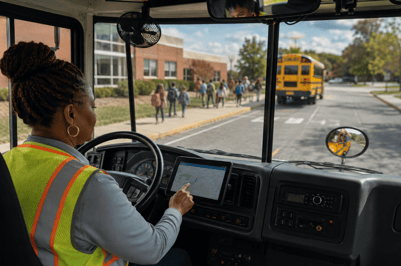 student records, practical route planning, clear driver instructions, reliable communication, and fast responses when conditions change.
The right student transportation safety software should connect these responsibilities in one environment. Use the following nine criteria to compare platforms for safety, compliance, real time visibility, and cost control.
1. Complete route planning
Look for school bus routing software that considers student eligibility, bus capacity, bell times, special transportation needs, safe stops, and ride time.
A routing tool should also make changes easier when enrollment, school schedules, or transportation boundaries change. ROUTEpatrol Web gives authorized staff a shared environment for route planning, scheduling, and optimization.
2. Reliable live visibility
Your team should be able to see bus locations, route progress, speed, and delays without waiting for a driver to call the office.
TRIPpatrol GPS Tracking displays vehicle locations on detailed maps and can show route history. It can also provide alerts when a vehicle leaves its planned route, exceeds a preset speed, or stops at an unauthorized location.
Live visibility helps dispatchers respond earlier and gives schools better information during delays or emergencies.
3. Student accountability
Vehicle tracking does not confirm which students are on board. Evaluate whether the platform records student boarding and exiting activity and connects that information to the correct bus and route.
STUDENTpatrol GPS Tracking supports RFID, NFC, and barcode based ridership collection. Transportation staff can use the information to answer important questions.
- Which students are on the bus now
- Did a student board at the assigned stop
- Which bus is carrying a student during an emergency
- Are actual rider counts different from planned assignments
This creates a clearer record from pickup through drop off.
4. Fast disruption response
Ask each vendor to demonstrate what happens when a driver is absent, a bus breaks down, or a road becomes unavailable. Effective bus tracking and routing should support a complete response process.
- Detect the disruption instantly Use dispatcher input, GPS information, or operational alerts to identify the issue.
- Reassign and adjust using intelligent software Review available buses, drivers, students, capacity, and route constraints before creating a new plan.
- Push instructions directly to driver tablets Send the updated route through the ROUTEpatrol Tablet App.
- Keep parents and schools informed Share accurate updates through PARENTpatrol and the district’s communication process.
DISPATCHpatrol supports real time route changes and helps reduce confusion caused by outdated paper directions.
5. Simple driver tools
Drivers need clear information that does not create unnecessary distractions. Evaluate tablet based navigation, stop sequences, ridership collection, inspection forms, and route updates.
The ROUTEpatrol Tablet App helps place route instructions and student information where drivers need them. It also reduces reliance on printed route sheets that can become outdated during the day.
Test the system with a substitute driver. If a new user cannot understand the next stop quickly, the software may create more work instead of reducing it.
6. Connected family communication
Parents and schools should receive information based on the same records available to dispatchers. Separate systems can create conflicting messages about delays, route changes, or arrival times.
PARENTpatrol provides bus locations, estimated arrival information, stop counts, and notifications about transportation changes. Consistent updates can reduce uncertainty for families and lower the number of calls to the transportation office.
7. Compliance and privacy controls
Software should help your team organize ridership records, route history, driver activity, inspections, and incident information. Ask how long records are retained, who can access them, and how reports can be exported.
Your vendor should also explain how its security controls support your district’s obligations under FERPA, the federal law that protects student education records. Confirm the use of role based access, secure authentication, data encryption, and documented procedures for handling student information.
Software supports school transportation compliance, but it does not replace local policies or state requirements. Your evaluation should include a review of the rules that apply to your district.
8. Useful analytics and cost measures
Reports should do more than show how many buses completed a route. Look for transportation safety analytics that reveal route deviations, late arrivals, recurring delays, speeding, missed stops, and ridership changes.
The same data can support district cost control. Track measures such as
- Miles traveled per student
- Empty miles
- Fuel use by vehicle
- Overtime caused by late routes
- Bus capacity use
- Manual time spent correcting records
- Routes that frequently require emergency changes
BusBoss Reports, the SmartRoute Dashboard, and Route Optimization can help leaders connect safety decisions with operating costs.
9. Integration and implementation support
A strong platform should fit your existing student information, GPS, communication, and administrative systems. Ask whether the vendor supports data integrations such as LiveSYNC, the SIF Agent, PowerSchool, or eSchoolData.
Also evaluate training, technical support, data ownership, and rollout planning. A platform that works well in a demonstration still needs to work during morning dispatch, afternoon dismissal, and emergency changes.
Summary and next step
The best student transportation safety software connects safe route design, live vehicle visibility, student accountability, driver support, family communication, compliance records, analytics, and district cost control.
When comparing providers, test the software with your own routes and real operating scenarios. Ask the vendor to demonstrate a student change, a late bus, a driver absence, a vehicle breakdown, and a communication update.
Schedule a BusBoss demonstration to see how an integrated approach can support your district’s daily transportation needs.

PRESIDENT
Sonia has been involved with BusBoss since the late 1990’s, and has personally overseen many projects for various customers ranging from large urban and suburban districts to smaller rural school districts from all over the country.

 (484) 941-0820